One checkbox broke the network, and every route table said it shouldn't have
contents
One checkbox broke the network, and every route table said it shouldn't have.
What made it hard is that every tool I trusted kept telling me everything was fine. Here's the full story, why it happens, and the checklist I use now so it doesn't happen again.
The setup
It was a textbook Azure hub-and-spoke:
- A firewall in the Hub VNet. All east-west traffic between spokes goes through it, so it can be inspected and logged.
- Spokes peered to the Hub. Spoke A and Spoke B each have a peering to the Hub, and the Hub has one back to each of them.
- UDRs on every spoke subnet. A route table sends traffic to the firewall's private IP, so Spoke A never talks to Spoke B directly.
Spokes are never peered to each other in this design. The hub is the only path, and the firewall is the only thing allowed to move traffic between them.
Everything looked right
I went through the usual list, and every item came back clean:
| Check | Result |
|---|---|
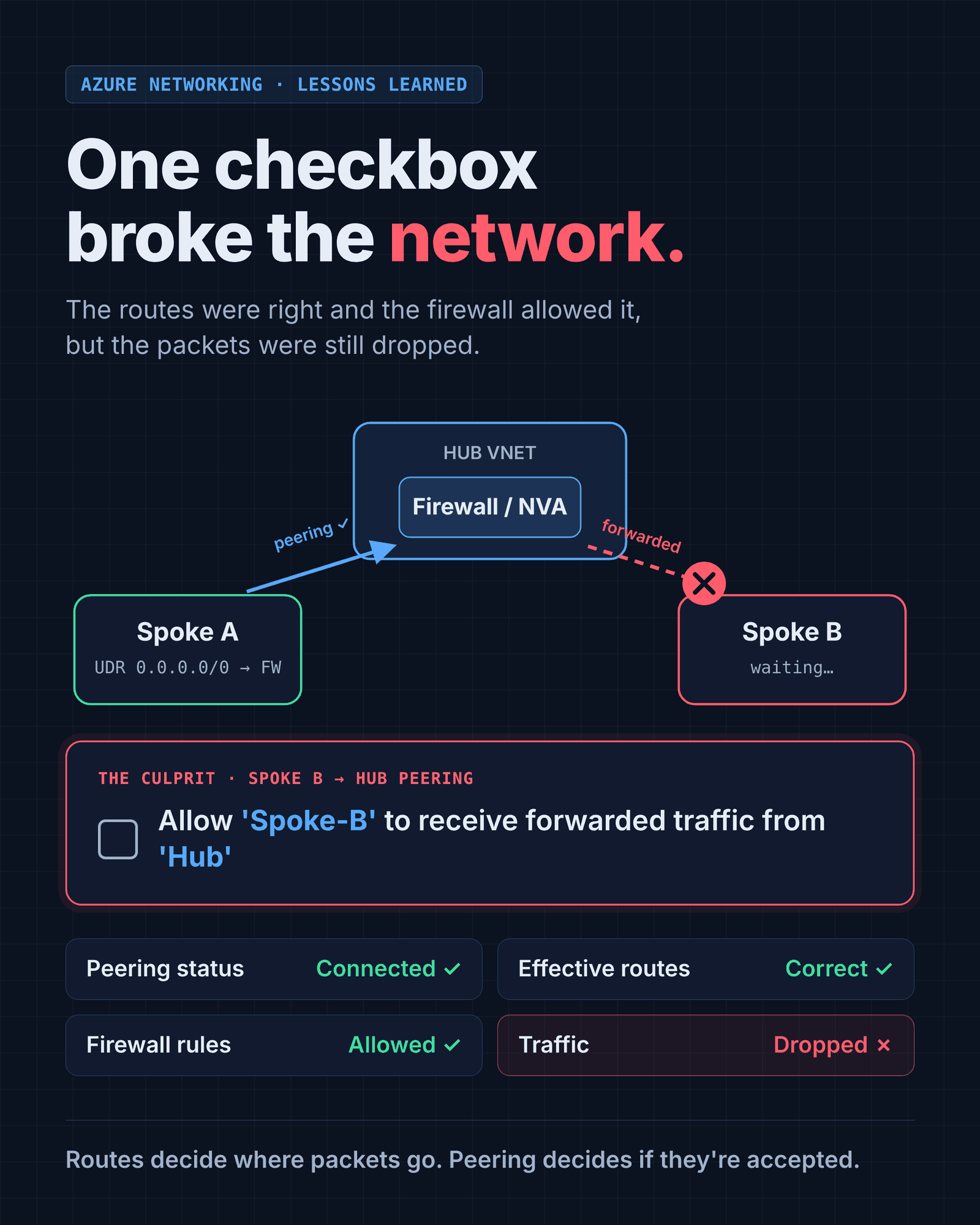
| Peering status | Connected on every link |
| Effective routes on the Spoke A NIC | Spoke B's range → next hop: firewall IP |
| Firewall rules | Spoke A → Spoke B allowed |
| Firewall logs | Traffic allowed and forwarded |
| Spoke A ↔ Spoke B | Nothing |
The firewall was receiving the packets, allowing them and sending them on towards Spoke B. They just never arrived.
The culprit
A single unchecked box on the peering between Spoke B and the Hub:
☐ Allow 'Spoke-B' to receive forwarded traffic from 'Hub'
In the API and in Terraform this is allowForwardedTraffic (allow_forwarded_traffic). It was off on Spoke B's side of the peering.
Why that one box matters
Follow the packet:
- A VM in Spoke A sends a packet to a VM in Spoke B. Source: Spoke A. Destination: Spoke B.
- The UDR in Spoke A sends it to the firewall in the Hub. That hop is fine: it's normal traffic going to an IP inside the peered Hub.
- The firewall inspects it, allows it, and forwards it to Spoke B. The source IP is still in Spoke A.
- The packet arrives at the Hub → Spoke B peering. Azure sees a packet coming from the Hub whose source is not in the Hub's address space.
To Azure, that's forwarded traffic. Unless the receiving VNet's peering explicitly allows it, the packet is dropped.
There's no error, no log entry and no rejected connection. The packet just disappears. From the firewall's point of view the job is done, and from Spoke B's point of view nothing ever arrived.
Where the setting lives
Every peering has two sides, and each side has its own settings. A hub-and-spoke pair looks like this:
| Peering | Lives on | allowForwardedTraffic means |
|---|---|---|
| Spoke B → Hub | Spoke B | Spoke B accepts traffic the Hub forwards from elsewhere |
| Hub → Spoke B | Hub | The Hub accepts traffic Spoke B forwards from elsewhere |
For traffic coming out of the firewall into a spoke, the one that matters is the spoke's peering to the hub. And because replies travel back through the firewall too, the same is true for Spoke A: the return packet (source: Spoke B) is forwarded traffic when it lands in Spoke A. In practice, every spoke's peering to the hub needs it enabled.
How to check it
You can see it in the portal on each peering, but the CLI is faster when you have several spokes:
az network vnet peering list -g <rg> --vnet-name <spoke-vnet> \
  --query "[].{name:name, state:peeringState, forwarded:allowForwardedTraffic}" -o table
And to fix one:
az network vnet peering update -g <rg> --vnet-name vnet-spoke-b -n spoke-b-to-hub \
  --set allowForwardedTraffic=true
The setting can be changed on an existing peering, so there's no need to delete and recreate it.
Keep it in code
Checkboxes in a portal are exactly how this kind of drift happens. If peerings are defined in Terraform or OpenTofu, the setting is explicit and reviewed like anything else:
resource "azurerm_virtual_network_peering" "spoke_b_to_hub" {
  name                      = "spoke-b-to-hub"
  resource_group_name       = azurerm_resource_group.spoke_b.name
  virtual_network_name      = azurerm_virtual_network.spoke_b.name
  remote_virtual_network_id = azurerm_virtual_network.hub.id

  allow_virtual_network_access = true
  allow_forwarded_traffic      = true   # required for traffic coming through the hub firewall
}
If every spoke is created from the same module, you fix it once and it can never be forgotten on spoke number seven.
Why the usual tools didn't help
Part of what made this hard is that the standard checks all look at a different layer:
- Peering status tells you the link exists. "Connected" says nothing about what's allowed over it.
- Effective routes tell you where a packet will be sent. They don't tell you whether the other side will accept it.
- Firewall logs stop at the firewall. Once the packet leaves, they've done their job.
- NSG checks like IP flow verify only evaluate security rules, and the NSGs were fine.
None of them looks at the peering's forwarded-traffic setting. That's why it's worth adding to your checklist on purpose.
Key takeaways
- A "Connected" peering doesn't guarantee traffic flows. It only means the link exists.
- UDRs decide where a packet goes. Peering settings decide whether it gets accepted when it arrives.
- Every peering has two sides, and each side has its own settings. Check both.
- VNet peering isn't transitive. Spoke-to-spoke traffic through a hub needs the routing and the forwarded-traffic permission, on every spoke.
- If the routes look right and the firewall says "allowed", check the peering configuration next.
- Put peerings in IaC so the setting is visible, reviewed and consistent.
Sometimes the hardest bug to find is a box nobody thought to look at.
Have you run into one of these silent killers in cloud networking? I'd like to hear about it: find me on LinkedIn.