How Argo CD actually works, and why I'd pick it again
contents
Every deploy I do ends the same way. A commit lands in a Git repo, and a few seconds later something inside the cluster notices, works out what changed, and makes the cluster match. Nobody runs kubectl apply. Nobody's laptop holds production credentials.
That something is Argo CD. I use it every day, and for a long time I treated it as a nice UI with a sync button. This post is what I wish I'd read earlier: what it actually does underneath, and why I'd choose it again over the alternatives.
The problem it solves
The classic way to deploy to Kubernetes is push-based. A CI pipeline builds an image, then runs helm upgrade or kubectl apply against the cluster.
It works, until it doesn't:
- The pipeline holds the keys. Your CI system needs cluster-admin-ish credentials for every cluster it deploys to. Every runner, every plugin, every leaked token is now a path into production.
- Nobody knows what's running. The pipeline ran last Tuesday. Since then someone did a
kubectl editduring an incident and never reverted it. The YAML in Git and the objects in the cluster have quietly drifted apart. - Rollback is a re-run. To go back, you find an old pipeline run and hope it's still reproducible.
- More clusters, more pain. Every new cluster means new credentials and new network paths from CI.
GitOps in one paragraph
GitOps flips the direction. The desired state of the system lives in Git, declared, versioned and reviewed like code. An agent running inside the cluster pulls that state and continuously reconciles the cluster towards it. If the cluster drifts, the agent notices. If you want to change production, you change Git. Git history becomes your deploy history, and git revert becomes your rollback.
Argo CD is that agent.
The moving parts
Argo CD isn't one process. It's a handful of components, each with one job:
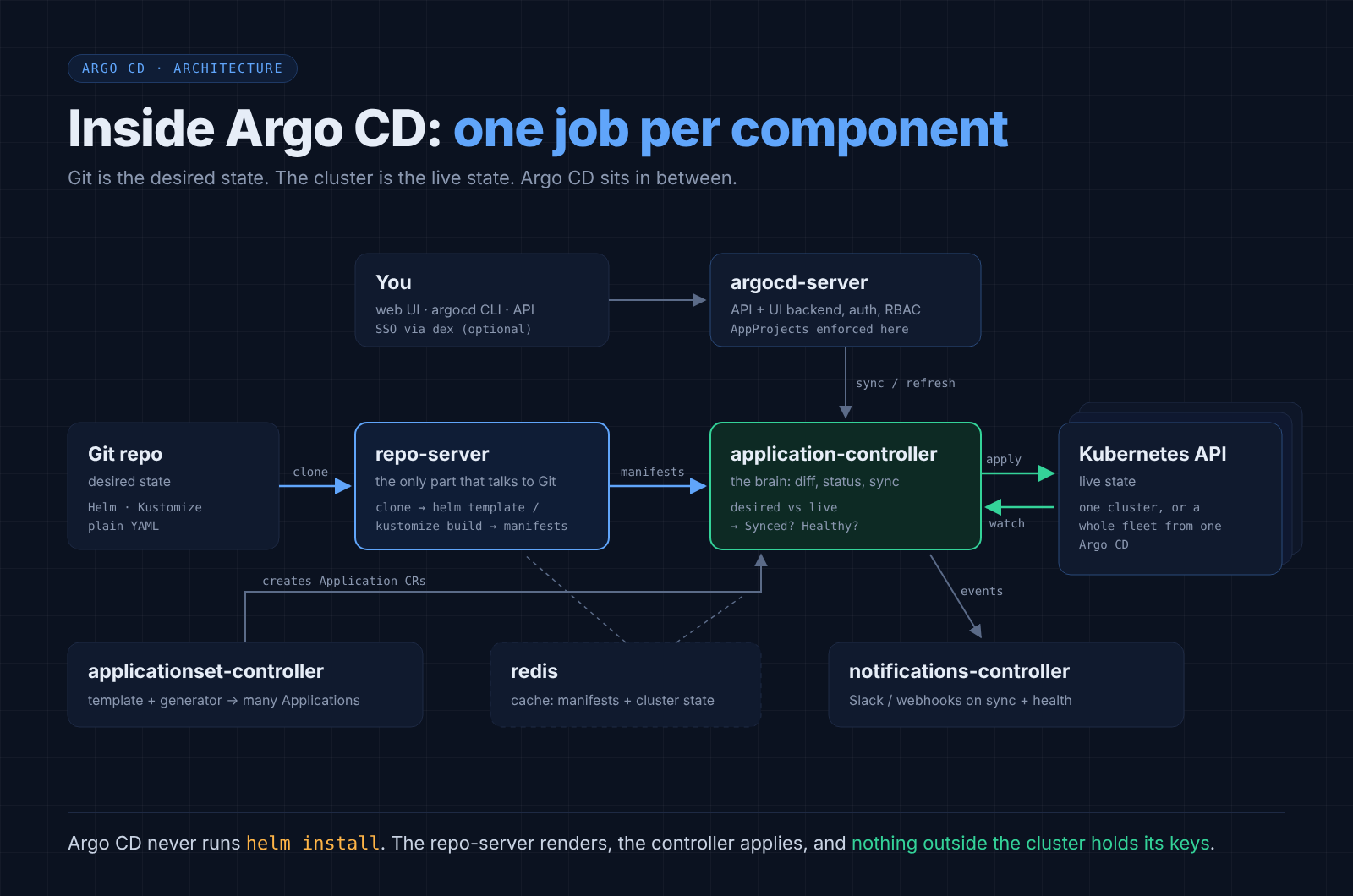
The two that matter most:
repo-server is the only component that talks to Git. It clones the repo, runs the right tool (Helm, Kustomize, Jsonnet or a config management plugin) and produces plain Kubernetes manifests. Notice what that means: when Argo CD "deploys a Helm chart", it does not run helm install. It runs helm template, then manages the resulting objects itself. There is no Helm release secret, and helm list shows nothing. That surprises people the first time.
application-controller is the brain. It watches the live cluster through the Kubernetes API, keeps a cache of every object it manages, and compares that against what the repo-server rendered. Everything you see in the UI, Synced or OutOfSync, Healthy or Degraded, comes from this comparison.
The Application: the unit of everything
You tell Argo CD what to manage with a custom resource called an Application. It's just a pointer: this path in this repo at this revision goes to this namespace in this cluster.
apiVersion: argoproj.io/v1alpha1
kind: Application
metadata:
  name: payments-api
  namespace: argocd
spec:
  project: backend
  source:
    repoURL: https://github.com/example/infra.git
    targetRevision: main
    path: apps/payments-api/overlays/prod
  destination:
    server: https://kubernetes.default.svc
    namespace: payments
  syncPolicy:
    automated:
      prune: true
      selfHeal: true
    syncOptions:
      - CreateNamespace=true
      - ServerSideApply=true
Because an Application is itself a Kubernetes object, you can keep it in Git too. That detail is what makes everything later in this post possible.
The reconcile loop
Here's what happens on every cycle, by default every three minutes, or immediately if Git sends a webhook:
- Fetch. repo-server resolves
targetRevision(a branch, tag or commit) to an exact commit SHA. - Render. It renders manifests for that commit. If the SHA hasn't changed, it serves them from cache.
- Diff. The controller compares rendered manifests against live objects. It normalises out fields Kubernetes fills in on its own, so a defaulted
imagePullPolicydoesn't count as drift. - Report. The Application gets two independent statuses: - Sync status: does live match Git?
SyncedorOutOfSync. - Health status: is the thing actually working?Healthy,Progressing,Degraded,MissingorSuspended. A Deployment is Healthy when its rollout has finished and replicas are available, not just when the object exists. - Sync (if automated, or when you press the button). The controller applies the difference, in order.
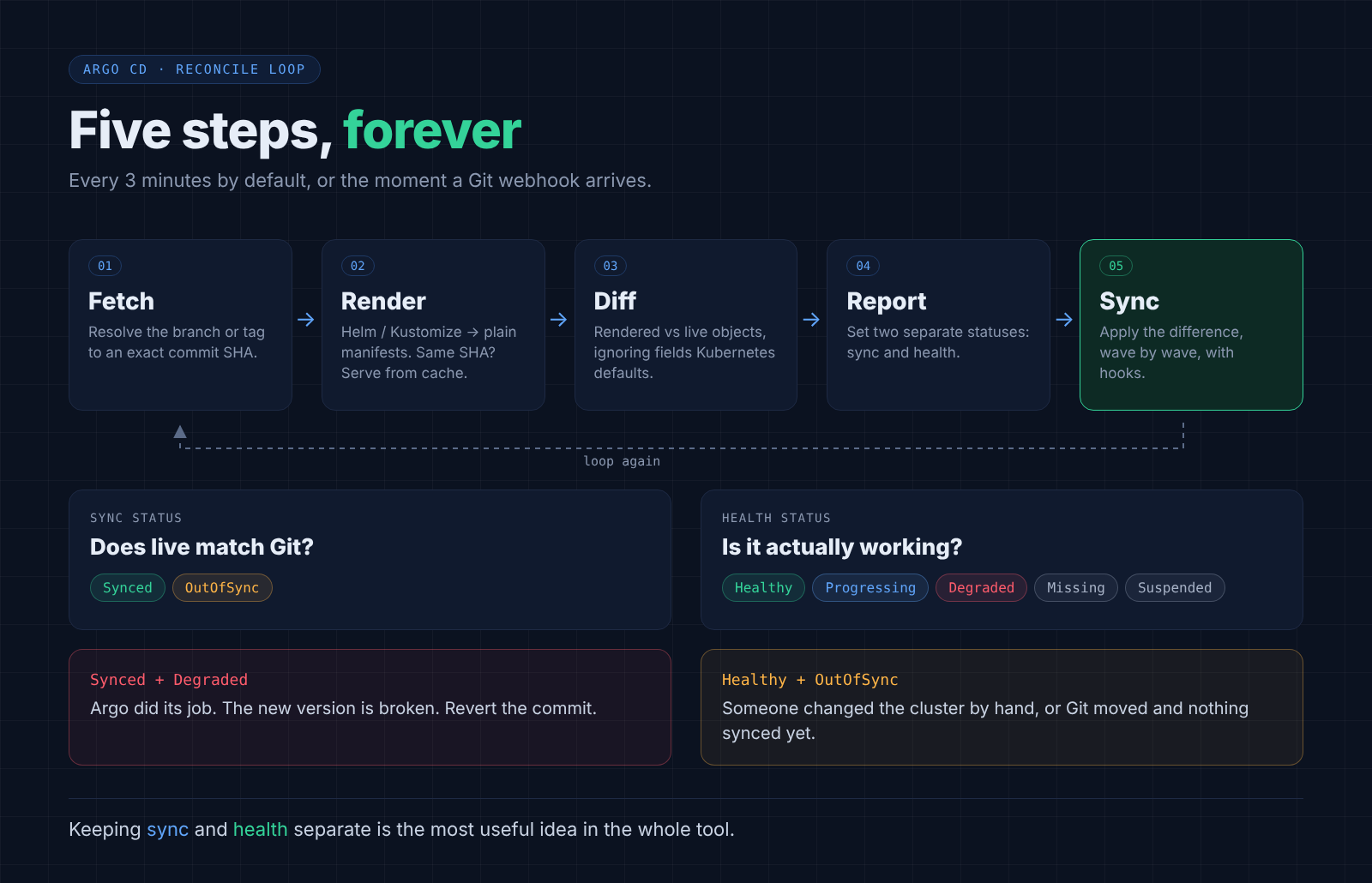
Keeping sync and health separate is the most useful idea in the whole tool. "Synced but Degraded" tells you exactly what happened: Argo did its job, and the new version is broken. "Healthy but OutOfSync" tells you someone changed the cluster by hand, or Git moved and you haven't synced.
Sync options that actually matter
The defaults are conservative. These are the knobs I end up reaching for:
automatedsyncs as soon as Git changes. Without it, OutOfSync just sits there waiting for a human.prune: truedeletes objects that were removed from Git. Off by default, because deleting things is how outages happen. Without it, a deleted Service lingers forever.selfHeal: truereverts manual changes in the cluster. Someone runskubectl scaleduring an incident, and seconds later Argo puts it back. Great for discipline, confusing at 3 a.m. if you forgot it was on.- Sync waves (
argocd.argoproj.io/sync-waveannotation) order the apply: namespaces and CRDs in wave-1, the app in0, things that depend on it after. Argo waits for each wave to become healthy before starting the next. - Hooks (
PreSync,Sync,PostSync,SyncFail) run Jobs at specific points. A database migration as aPreSyncJob is the classic one. ignoreDifferencestells Argo to stop caring about specific fields. You need it more often than you'd expect (see the HPA gotcha below).ServerSideApply=trueuses Kubernetes server-side apply instead of the client-side kind. It fixes the "annotation too long" error on big CRDs and plays better with other controllers touching the same objects.
Scaling past a handful of apps
Writing one Application per service per environment by hand stops being fun around app number twenty. Two patterns fix it.
App of apps. One parent Application points at a folder full of child Application manifests. Add a file to that folder, and a new app appears. This is how you bootstrap a whole cluster from a single kubectl apply.
ApplicationSets. A template plus a generator. The generator produces a list of parameters and the controller stamps out one Application per item:
- a list generator for a fixed set of environments
- a cluster generator for every cluster registered in Argo CD
- a git generator for every folder (or config file) in a repo
- a matrix generator to combine two of the above, like every service on every cluster
Add a cluster, and every app shows up on it. Add a folder, and a new service is deployed everywhere it should be. Recent releases have put a lot of work into ApplicationSets, and they're now the way I'd structure any new setup.
On top of that, AppProjects draw the boundaries: which repos a team can deploy from, which clusters and namespaces they can deploy to, and which kinds of objects they're allowed to create. That's what lets several teams share one Argo CD without stepping on each other.
Why Argo CD over the others
There are three real alternatives I've weighed it against.
| Pipeline push (kubectl/helm in CI) | Flux | Spinnaker | Argo CD | |
|---|---|---|---|---|
| Model | Push | Pull (GitOps) | Push, pipeline-driven | Pull (GitOps) |
| Cluster creds live in | CI system | The cluster | Spinnaker | The cluster (or one Argo hub) |
| Drift detection | None | Yes | Limited | Yes, visualised per object |
| UI | Pipeline logs | None built in | Heavy | Built in, the best of the lot |
| Multi-cluster | One credential per cluster | One Flux per cluster | Yes | One control plane, many clusters |
| Weight | Lightest | Light | Very heavy | Medium |
vs. pipeline deploys. The pipeline should build and test. It shouldn't hold the keys to production. With Argo CD, the only thing CI does at the end is commit a new image tag to the infra repo. Credentials stay inside the cluster, drift becomes visible, and rollback is a revert.
vs. Flux. This is the honest comparison, because Flux is genuinely good. It's lighter, it's built as a set of small Kubernetes controllers, it leans on native Kubernetes RBAC, and it has image automation (watch a registry, commit the new tag) built in. If you want GitOps with no UI and minimal moving parts, Flux is a great choice. I pick Argo CD for three reasons:
- The UI. Seeing the whole tree, Deployment to ReplicaSet to Pod, with a live diff of exactly which field drifted, saves real time during incidents. And it lets developers check their own deploys without asking me.
- One control plane for many clusters. A single Argo CD can manage a fleet. Flux typically runs inside each cluster.
- Sync and health as first-class ideas, with waves and hooks that make ordering explicit.
vs. Spinnaker. Spinnaker is a full delivery platform with pipelines, stages and manual judgements across clouds. It's powerful and very heavy to run. For Kubernetes-only teams, Argo CD (plus Argo Rollouts if you need canaries) covers the same ground at a fraction of the operational cost.
Gotchas I've hit
- Secrets don't go in Git. Argo CD has no opinion on secrets. Pair it with External Secrets Operator, Sealed Secrets or SOPS, so Git holds a reference or an encrypted blob, never the value.
- HPA vs selfHeal. If your manifest sets
replicas: 3and an HPA scales to 8, Argo sees drift and scales you back to 3. Either removereplicasfrom the manifest when an HPA owns it, or add/spec/replicastoignoreDifferences. - Image tags need a commit. Argo watches Git, not your registry. Pushing
my-app:latestchanges nothing. Something has to write the new tag into Git: your CI, a release tool, or Argo CD Image Updater. Pin real tags or digests, neverlatest. - Helm hooks become Argo hooks. Since Argo renders charts with
helm template, Helm hooks are translated into Argo's own hook phases. Most charts work fine, a few behave subtly differently. - Big repos, big repo-server. A monorepo with hundreds of apps means a lot of cloning and rendering. Give the repo-server memory, use webhooks instead of relying on polling, and shard the application-controller once you're managing many clusters.
- Auto-sync plus prune is sharp. A bad commit that deletes a folder will delete those objects from the cluster. Branch protection and review on the infra repo are not optional.
What a deploy looks like for me
The flow I run every day is boring, which is the point:
- A service's CI builds and pushes an image.
- A release step commits the new image tag to the infra repo.
- Argo CD sees the commit, renders, diffs, and syncs.
- The Application goes
OutOfSync→Synced, thenProgressing→Healthy. - If it ends up
Degraded, the fix is a revert of that one commit.
No one needs cluster credentials to ship. Every change to production has an author, a timestamp and a diff. And when something in the cluster doesn't match what Git says it should be, I find out from a status badge instead of from an outage.
That's the whole pitch for GitOps, and Argo CD is still the version of it I'd pick.