Docker's bridge network quietly broke my VNet peering
contents
I spun up a new VM in a separate VNet, installed Docker and set up Docker Swarm for scaling and load balancing. Everything looked healthy: containers were up and the APIs were responding.
At the same time I had another service running on AKS. The VM's VNet and the AKS VNet were already peered, so I expected to call the VM service from AKS over its private IP without any extra work.
It didn't work. The AKS pods simply could not talk to the VM.
The setup
- VNet A: a VM running Docker Swarm, exposing an API on its private IP.
- VNet B: an AKS cluster with a service that needed to call that API.
- VNet peering between A and B, already in place and showing as connected.
Peering only works when the address spaces don't overlap, and they didn't. On paper, the path was fine.
Days in the rabbit hole
I traced routes, re-checked the peering, tweaked subnets and went through NSG rules again. Nothing changed. The peering was healthy, the routes looked right, and the pods still timed out.
Then my manager asked the question that cracked it:
"Om, what exactly is running on that VM?"
"Docker Swarm."
"Stop Docker for a second and try pinging again."
So I did:
sudo systemctl stop docker.socket
sudo systemctl stop docker
And the pings started working.
What was actually happening
Docker creates its own bridge networks on the host, and it picks their subnets from built-in defaults in the private 172.x.x.x space. The default docker0 bridge, for example, usually gets 172.17.0.0/16, and Swarm adds more bridges such as docker_gwbridge.
Every one of those bridges adds a route to the VM's routing table. One of Docker's ranges overlapped with the address range my AKS traffic was coming from. So when a request from AKS reached the VM, the VM sent its reply to the local Docker bridge instead of back out through the NIC. The request arrived, the answer never left the box.
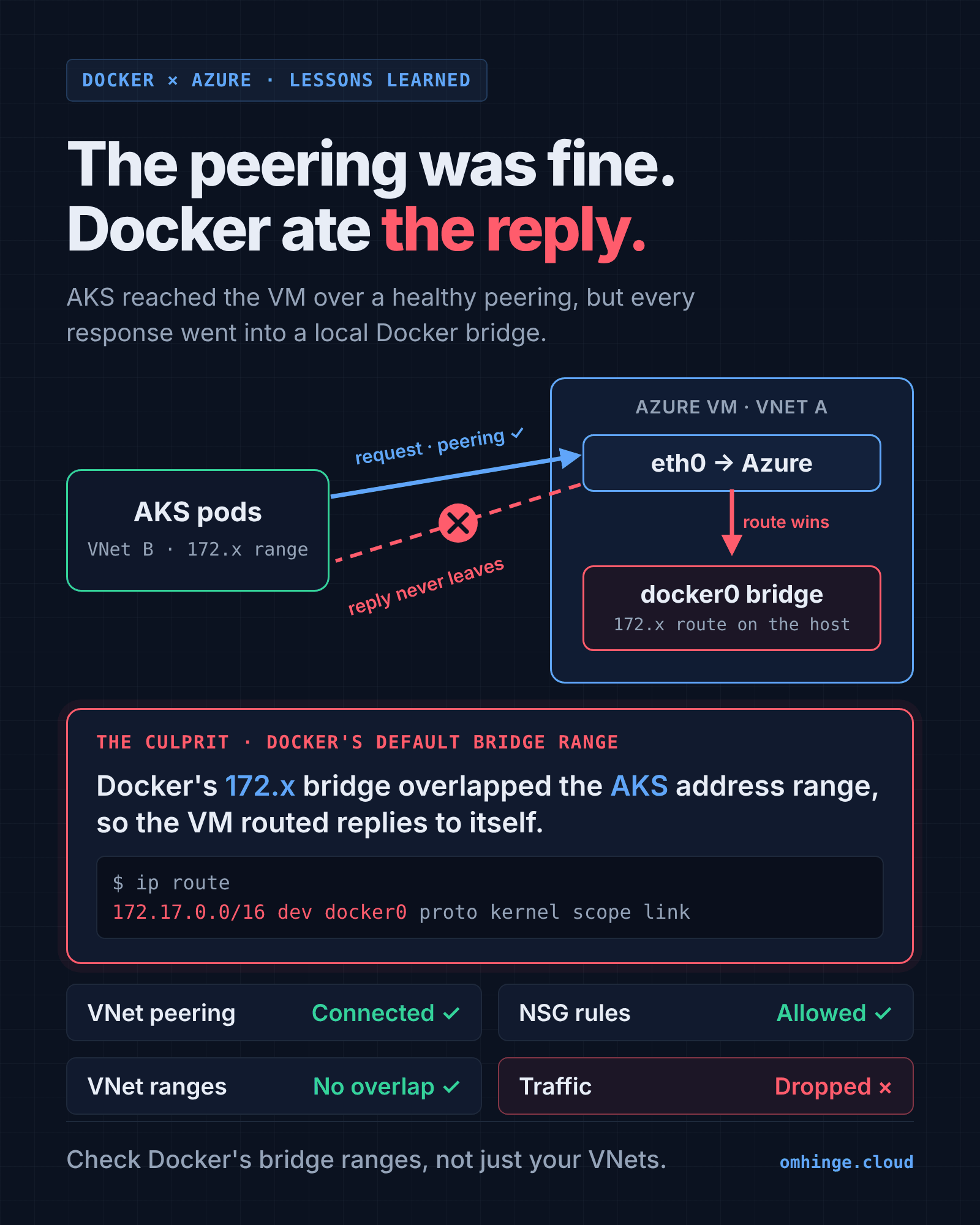
That's why nothing looked wrong in Azure. The VNets, the peering and the NSGs were all fine. The problem lived inside the VM's own routing table, which no Azure dashboard shows you.
The fix
I gave Docker a custom address range that doesn't overlap with anything in the Azure network, in /etc/docker/daemon.json. Then I restarted Docker, redeployed the Swarm, and traffic between AKS and the VM started flowing.
A config along these lines does it. The ranges below are examples; pick ones that don't collide with any VNet, peered VNet, pod CIDR or on-prem range you route to:
{
  "bip": "10.250.0.1/24",
  "default-address-pools": [
    { "base": "10.251.0.0/16", "size": 24 }
  ]
}
bip sets the address of the default docker0 bridge, and default-address-pools controls where Docker carves new bridge networks from, including the ones Swarm creates. Swarm's overlay networks have their own setting, docker swarm init --default-addr-pool, which is worth setting at the same time.
How I'd debug this faster next time
Run these on the VM before blaming the cloud network:
ip route                                 # look for 172.x routes pointing at docker0 / br-* / docker_gwbridge
docker network inspect bridge --format '{{json .IPAM.Config}}'
docker network ls                         # every bridge here is a route on the host
And compare against what Azure is using:
az network vnet show -g <rg> -n <vnet> --query addressSpace
az aks show -g <rg> -n <cluster> --query networkProfile
If any of Docker's ranges sit inside an Azure range you need to reach, you've found it.
Takeaways
- When you mix VMs, Docker and AKS across VNets, check for overlaps between Docker bridge ranges, VNet ranges and pod CIDRs, not just between VNets.
- Cloud networking can be perfectly healthy while the host's own routing table drops your traffic.
- Pin Docker's address pools on any VM that talks to private networks. It costs one config file.
- And yes, it's always the network.
Originally posted on LinkedIn. This version is expanded.